Introduction
Welcome!
Publishing a printed book about artificial intelligence right now is almost like trying to stop time. That is why I chose digital publication: it can be updated nearly as fast as the field itself changes.
The goal of this material is not to be exhaustive. It is a practical reference guide from which you can retrieve a specific idea, copy a prompt and adapt it to your own use case.
If you have questions, feel free to reach out. In the “Contacts” section at the end of this e-book you will find multiple channels for that.
This e-book was optimized for larger screens such as desktops and tablets, but it also remains usable on smaller screens.
Basic mechanics das ferramentas de IA
Keeping theoretical definitions to the minimum needed: understanding how AI tools work is essential if you want to extract their best results. That is the only reason it makes sense to learn the basics of their foundations, and it is not especially difficult. As you have probably heard, ChatGPT and related systems work, broadly speaking, like very large text predictors. We are already somewhat used to that logic in daily apps. On a phone, for example, when replying to e-mails, we barely start typing and a suggested continuation already appears (Figure 01).
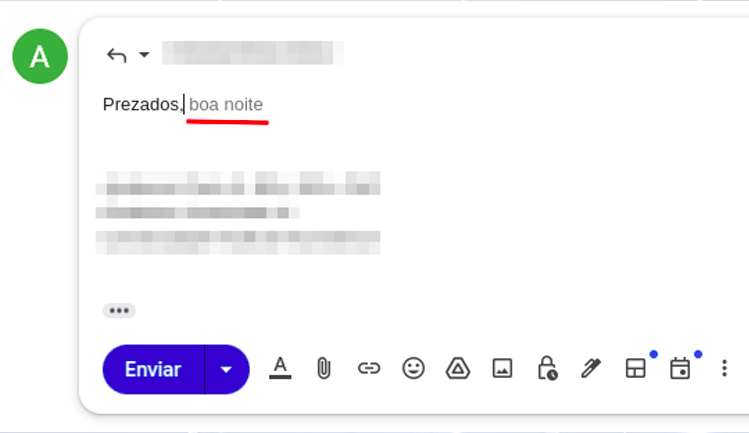
That autocomplete happens because of context and because of the probability of words appearing in sequence. If I ask you to complete the phrase “the sky is [___],” which word comes to mind? The chance that you think of “blue” or “big” is much higher than the chance that you think of “crimson.” All of those sentences are technically valid, but they are not used with the same frequency in everyday life.
How does that apply to AI tools? They were shown, or “trained” on, billions of texts and materials, so they have information about the probability of words occurring in sequence. Of course the real mechanism is far more complex than that, but this analogy is enough to help us use AI tools more effectively.
In the context of this e-book, “training” is simply the process of presenting source material, such as texts in different languages, to AI systems so they can detect patterns and then decide which word or text fragment is most likely to come next.
AI models
When you open AI tools such as Gemini or ChatGPT, you will often see the option to choose between different models. You can think of them as different “versions” of AI, much like bicycles with different setups or different trims of a car. There are no absolutely “right” or “wrong” models: there are models that fit certain tasks better, with different capabilities, prices and usage limits.
Two categories matter here: so-called reasoning models and more standard models. In theory, reasoning models are better suited to complex tasks that involve weighing multiple factors. They are more capable in terms of processing, but they also tend to be slower when generating answers.
In practice, do not overthink this point. By 2026 many models already behave as reasoning models, or the platform does not even ask you to choose explicitly. The most useful approach is to test the available products and models and observe which ones deliver the best answers for each task.
Main tools
A frequent question I get is: “which tool is best?” The most honest answer is always: “it depends.” What is better, a hammer, a screwdriver or a pair of pliers? It depends on what you need to do.
The same logic applies to AI assistants. GPT, Gemini and Claude are the best known. GPT currently offers the strongest Deep Research experience. Gemini stands out for its integration with the Google ecosystem and has improved substantially since launch. Claude, in turn, performs especially well for writing and for tasks related to programming.
If you are considering paying for an AI assistant, follow these steps:
- Test the free versions of the services you are considering for at least one to two months.
- Do not subscribe to so-called “AI aggregators,” meaning sites that sell access to multiple models at low promotional prices. They are unlikely to meet your needs properly, and with affordable Gemini and ChatGPT plans available, intermediaries are rarely worth it.
- You can use Google models for free at https://ai.dev.
Below is a curated list of major AI tools currently available, both free and paid.
Using the tools: the question, input or prompt
Let us start with the prompt. This is a core concept: a prompt is the name we give to the instructions we pass to AI tools.
Core aspects of the prompt
Let us understand prompting in the most direct possible way: imagine you are having a snack and a friend says, “pass me the sleeve.” There is an implicit context if you are a tailor, and a completely different one if you are eating fruit. If the surrounding situation changes, the same word points to something else, and the instruction no longer behaves as expected. Prompting works the same way: without context, the model may map your instruction to the wrong interpretation.
Context matters. In prompting, it matters even more.Effective prompts are specific prompts.
More effective prompts are specific and provide context.
That leads to another important concept: it is more useful to think in terms of efficient and inefficient prompts than in terms of right or wrong prompts. What makes a prompt more efficient is your practical ability to match what you write to the task you actually need to solve. In that sense, prompting is simply another form of deliberate communication.
Prompt examples:
1) Direct prompt
"Translate the song lyrics below into Brazilian Portuguese" => this is a direct prompt: valid, simple, and sometimes very useful, depending on what you need.
Command: translate, transcribe, analyze, revise, produce, organize (...)
Object: the song lyrics, the text, the document, the PDF, the file, the image (...)
Output parameter: into Portuguese, for a conference, for a presentation (...)
2) Prompt with context
Here we add context to the prompt (“it will be submitted as a conference abstract (...)”). Why does that matter? Because preparing a text for a professional congress is very different from writing something for social media, for example.
"The text below will be submitted as an abstract for a conference paper in [psychology/engineering/law/medicine]. Review its grammar, coherence and cohesion, suggesting changes whenever needed."3) Everyday prompt
Here is another example: AI can also help with everyday matters. A friend of mine uses it for cooking, from recipes to choosing the best fruit at the market. Explore that versatility with the prompt below. And if you still do not know what an RCD is, adapt the prompt and learn the basics first. Just do not expect to know more than the electrician: AI still makes mistakes. The goal is to gain enough orientation to hold an informed conversation.
"An electrician came to my home and said I need to install a residual-current device (RCD). Explain what it is and what its function is."4) Prompt with persona
In this prompt, besides command, object, output parameter and context, we also define a persona for the AI. This is an especially useful prompt pattern for learning workflows, and for good reason it is one of the most widely used formats.
"You will act as an expert radiology instructor. I have 20 days to learn the fundamentals of ultrasonography and you will be my teacher: build a detailed learning schedule for those 20 days, covering the key ultrasound concepts that an excellent introductory module should include."5) Composite prompt
Below we combine several of the prompt strategies listed above.
"You will act as an English teacher specialized in teaching English as a foreign language. I have 20 minutes per day and you will be my instructor: build a detailed learning plan with basic, intermediate and advanced English content so that a foreign learner can communicate adequately.

We can begin immediately, and your first task is to assess my current English level. Ask the necessary questions to evaluate my skills."
Notice that in the example above the prompt structure instructs the AI model to begin by asking questions to assess our English level. This technique is often called reverse prompting and can be extremely useful for evaluating knowledge, performance, or even for making us reflect before the answer is produced. Here is another example:
You are a senior career coach with 20 years of experience in professional transitions, specialized in helping professionals in IT, engineering and creative fields change careers with clarity and confidence. Your style is empathetic, direct and evidence-based, inspired by methods such as Ikigai and GROW.

**Context**: The user is considering a professional transition, such as changing jobs, sectors or even starting a business, but needs to reflect deeply in order to avoid regret. We are in an iterative conversation to map the best path.

**Objective**: Help the user reflect on their current moment, identify real motivations, strengths and obstacles, and build a personalized transition plan in clear, actionable steps.

**Tasks (reverse prompting)**: DO NOT give advice or plans yet. Instead, ask 5 to 7 essential open-ended questions to collect key information. Group them into categories (for example: "Current situation", "Motivations and values", "Skills and network"). After the user responds, use the answers to produce an initial reflection report and draft plan.

**Initial questions to ask NOW**:
1. What is your current profession, how long have you worked in it, and what do you most like and dislike about it?
2. Why do you want to make a transition now? Describe the emotional or practical triggers.
3. What are your core skills (technical and soft skills) and which achievements are you most proud of?
4. What would success in the new career look like for you (for example: salary, flexibility, impact)?
5. What real obstacles do you anticipate (finances, family, market conditions)?
6. Describe your professional network and who might help you in this transition.
7. On a scale from 1 to 10, how ready do you feel to change within the next 6 to 12 months?

Analyze the answers and confirm understanding before proceeding.
Context window
You may already have noticed that in very long conversations the AI sometimes becomes confused and starts returning relatively random material, as if it had forgotten what was said at the beginning of the exchange. That happens because of the context window. The easiest way to understand it is to imagine it as the AI’s short-term memory. In practice, it is the maximum amount of information (text, files, images) that the model can process at the same time in a single interaction. This window is measured in thousands or millions of tokens. Roughly speaking, tokens are the basic processing units used by AI systems. During prompt processing, words are split into smaller parts (tokenization), so a long word may correspond to multiple tokens while a short word may correspond to one, depending on the language. For practical purposes, although technically imprecise, you can think of words as a rough proxy for tokens.
When that window becomes “full,” the AI has more trouble retrieving earlier information, which can cause it to forget important instructions, especially the ones that were placed in the middle of the conversation. In general, models tend to handle the beginning and the end of a conversation better than the middle, which means key instructions can be lost if they are buried halfway through a long exchange.
Context-window sizes vary considerably from one AI tool to another. Gemini, for example, offers one of the largest currently available windows, reaching 1 million tokens. Claude recently released Opus 4.6 with the same capacity, while ChatGPT 5.2 works with a 400,000-token context window.
Practical tip: To reduce hallucinations in long projects with conventional AIs (such as GPT and Claude), do not keep the same chat open forever. When the topic changes or the conversation becomes too long, ask for a summary and start a new chat. That effectively resets the context window and keeps the model sharper.
Use the prompt below to generate that migration summary:
[CONTEXT]
We are in a long interaction about [INSERT THE TOPIC, e.g., drafting a protocol].
To avoid losing important details and to clear the context window before a new chat, I need you to condense everything we have done so far.

[TASK]
Generate a detailed "Current State Summary" containing:
1. The main objective we are pursuing.
2. All decisions already made and validated (what is already done).
3. The exact current status of where we stopped.
4. The immediate next steps that were pending.
5. Any stylistic preferences or constraints I already taught you in this conversation.

[FORMAT]
The output must be a structured text, ready to be copied and pasted as the FIRST prompt of a new chat, so that the new AI instance can continue the work exactly where we stopped, without losing context.
Anatomy of the "perfect" prompt
From the previous section, we know that some prompts are more appropriate than others for a given task. That naturally raises a frequent question: is there a “perfect” prompt? The answer is no single prompt is perfect, but there are components that, when organized well, produce excellent results for most tasks.
Elements of a well-built prompt
1) Persona
2) Objective
3) Context
4) Task
5) Constraints
6) Output format
Not every component is mandatory. For a simple task, you may not need persona, context or explicit constraints.
Example 1
Persona:
You will act as a human-resources manager.

Objective:
Create objective criteria for evaluating administrative performance.

Context:
An administrative team composed of assistants and analysts.

Task:
1. Define measurable criteria.
2. Propose an evaluation scale.
3. Suggest an assessment frequency.

Response format:
A table with criteria, description and scoring scale.
Example 2
Persona:
You will act as a corporate-communications consultant.

Objective:
Draft an internal communication about the implementation of a new administrative system.

Context:
Employees with different levels of familiarity with technology.

Task:
1. Explain the reason for the change.
2. Highlight operational benefits.
3. Inform the next steps.

Constraints:
Use simple, accessible language.
Avoid jargon and unnecessary technical terms.

Response format:
An institutional announcement in continuous prose.
Example 3
Persona:
You will act as the internal compliance lead.

Objective:
Assess administrative risks in a supplier-contracting process.

Context:
Recurring procurement of outsourced services.

Task:
1. Identify operational risks.
2. Identify basic legal risks.
3. Propose simple administrative controls.

Response format:
A table followed by a brief conclusion.
In practice, prompts can be shorter or longer and may contain more or fewer elements. In some contexts direct prompts work very well; in others you will need much more structure and detail.
Basic
You are a text editor. Review the abstract below for grammar, cohesion and coherence. Structure it into paragraphs.Intermediate
You are a scientific editor specialized in medicine with 15 years of experience in international journals.

This abstract will be submitted to JAMA as a structured abstract.

Review the abstract below for:
- Grammar and clarity in scientific English
- IMRAD structure (Introduction, Methods, Results, Discussion)
- A maximum length of 300 words

Expected format: paragraphs with bold subsection headings.
Advanced
[SYSTEM]
You are a senior scientific editor specialized in medicine with 15 years of experience in international journals (JAMA, Lancet, NEJM). Your task is to perform a critical editorial review.

[CONTEXT]
This abstract will be submitted to JAMA. Audience: editors, reviewers and international clinical readers. Expected standard: editorial excellence.

[ACTION]
Review and rewrite the abstract below while preserving scientific integrity and maximizing clarity.

[POSITIVE CONSTRAINTS]
- Structure: IMRAD with bold subsection headings
- Length: maximum 300 words
- Style: formal scientific English, active voice whenever possible
- Citations: use bracketed numbers [1], [2], etc.
- Data: preserve all original numbers and values exactly

[NEGATIVE CONSTRAINTS]
- Do not speculate beyond the presented data
- Do not use nonstandard jargon or undefined abbreviations
- Do not alter the scientific conclusions; only clarify expression

[EXPECTED FORMAT EXAMPLE]
**Introduction.** [2-3 sentences on the problem and the knowledge gap]
**Methods.** [Design, population, intervention]
**Results.** [Main findings with values]
**Discussion.** [Clinical meaning, limitations, next steps]

[VALIDATION]
Before answering, confirm:
✓ Does every claim have a supporting source or citation?
✓ Is the length within 300 words?
✓ Is the IMRAD structure preserved?

If any criterion is not met, state which one before delivering the revision.
Nível Advanced: Checklist de qualidade
To evaluate whether your prompt is “good enough”, use this checklist:
"Answer about the effectiveness of vitamin D in COVID-19. You MUST provide answers based only on scientific evidence. Cite your sources explicitly."
Although they are semantically identical, Version A tends to produce better compliance because the model reads the restriction first and treats it as a high-priority policy for the task.
Recency and primacy
Language models tend to give more weight to information at the beginning and at the end of the prompt:
- Instructions at the beginning influence the overall response policy. If you define tone, persona, or foundational constraints upfront, the model tends to treat them as guiding principles (primacy effect).
- Instructions at the end influence the immediate action. If the final instruction is "answer in 100 words," the model will usually prioritize that rule in the current output, even when earlier parts pull in another direction (recency effect).
This leads to a practical problem: instructions buried in the middle of a long prompt are often the easiest to lose. They usually have the lowest compliance rate.
Example:
Source restrictions (PubMed only, last 5 years) tend to be followed less when placed in the middle of the prompt than when placed right after the persona. That small adjustment can make a substantial difference.
Example:
Start: "You MUST cite only primary sources."
End: "Before finishing, confirm that ALL claims include a citation from a primary source."
ℹ️
Reminder: another anatomy of a strong prompt
(1) Persona — at the beginning, it defines "who you are"
(2) Core constraints — immediately after the persona
(3) Context/Problem — in the middle
(4) Expected format — near the end
(5) Specific action — at the end, as the final trigger
(6) Summary/repetition of whatever is critical
Prompt chunking
In some situations you will need an inevitably long prompt. One of the best ways to preserve performance is to split it into blocks or stages and use explicit structures such as markup or JSON.
Instead of a 2,000-word prompt with multiple scattered instructions, create:
BLOCK 1: [Persona + core constraints]
BLOCK 2: [Context + problem]
BLOCK 3: [Action + expected format + validation]
The finishing touch
There are more advanced techniques for output checking (covered later in this e-book), but one simple command can already help in factual tasks: "Review the output before reproducing it, and if it does not match the requested input, restart the process. Continue until there are no inconsistencies or incoherences."
Example: "[Insert your system prompt here] To confirm that you read these instructions, begin your answer with: 'I understand that I must [brief summary of the critical instruction].' Then continue with the response."
📐 Recommended order for professional prompts
Start (primacy): Persona + core/absolute constraints
Context: Context, purpose, audience
Action: What to do (specific command)
Details: Format, examples, negative constraints
End (recency): Validation and final instruction (in long prompts, a brief recap of the request can help)
GPT: general customization, Projects and GPTs
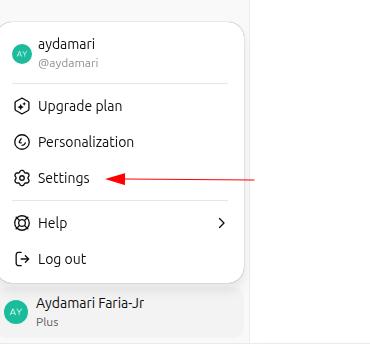
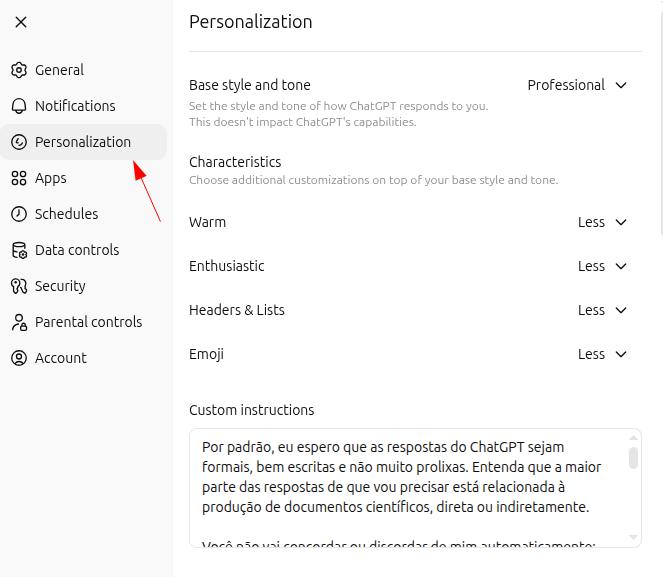
You can customize GPT around your day-to-day use and make it fit your needs even better. Open your ChatGPT settings and go to "customization":
General "master" prompt
By default, I expect responses to be formal, concise, and well structured. Most of my requests are directly or indirectly related to producing scientific documents.

Do not agree or disagree with me automatically. Analyze my prompts and answer as objectively as possible.

To ensure these guidelines are actually followed, I will always begin my interactions with "let's work" or "vamos trabalhar" and I expect to be addressed as ["[YOUR NAME]"]. In these situations, responses must remain absolutely neutral: do not try to agree with or oppose my doubts, thoughts, or opinions. Critically analyze the text provided and deliver the most appropriate answer, rigorously avoiding errors, inaccuracies, and hallucinations.
Projects: custom workspaces
OpenAI itself defines Projects as specialized "workspaces." Imagine that you work across multiple roles within the same company, or across different companies: you can create one Project for each context, with tailored instructions and files for that environment.
Each project supports a master prompt attached to that activity, plus reference files. The combination of a precise prompt with relevant documents turns projects into genuinely useful custom assistants. For context: Gemini calls them "Gems"; Claude calls them "Projects." Most major AI tools now offer some version of this kind of personalization.
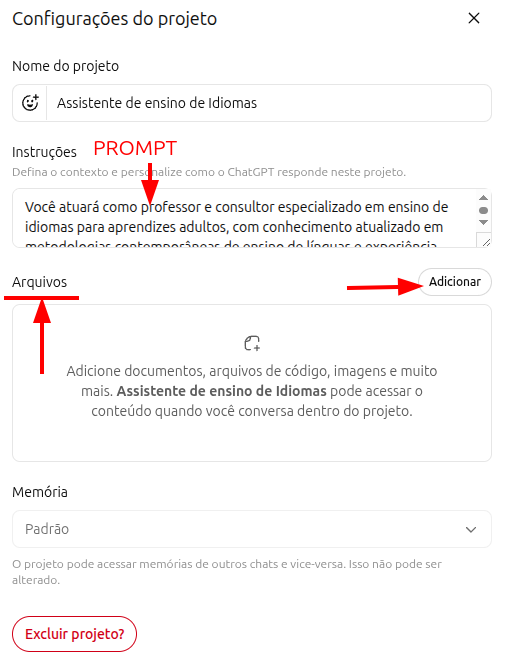
Prompt example for a language-learning Project
You will act as a teacher and consultant specialized in language instruction for adults, grounded in contemporary approaches such as Task-Based Learning, Communicative Language Teaching, and related methods.

You will use andragogy and neuroeducation to build programs in any language, prioritizing communicative competence and functional fluency before grammatical precision.

Tasks include:
- Building structured modular programs adapted to the learner's CEFR level (A1-C2) and specific goals
- Leading practical conversation with progressive immersion
- Producing exercises anchored in spaced repetition, interleaving, and retrieval practice
- Providing immediate, specific, action-oriented feedback
- Running formative assessment continuously, with dynamic adaptation of difficulty
Difference between Projects and GPTs
What is now called a "GPT" inside ChatGPT used to be called a "plugin," and it was meaningfully different from Projects. As both tools evolved, they became more similar. In practical terms: think of GPTs as custom work environments designed to be shared with other people, whereas Projects are built primarily for individual use, even though they can also be shared.
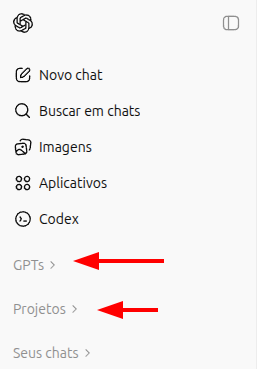
Attention: Attention: many people have started calling GPTs "agents" in order to sell them at very high prices. Understand the tool before paying for it: you can automate processes using GPTs, but technically they are not agents. If someone is charging heavily for a GPT, it may be worth asking whether you could build your own instead.
Deep Research
Standard search, whether through Google or a general-purpose AI assistant, is like asking a librarian about a topic and being handed the last book that person read. You get information quickly, but it is limited. Deep Research, by contrast, is like hiring a professional researcher: it (1) creates a research plan, (2) reads dozens of articles and sources, (3) cross-checks conflicting information, (4) goes back to primary sources when needed, and (5) writes a consolidated report. It takes longer, from a few minutes to roughly half an hour, but the result is far deeper.
Deep Research is useful at both ends of the knowledge spectrum: when you "know nothing yet" and need a minimal base before meeting a specialist, and when you "already know a lot" but need a fast update on the latest literature. Be explicit about the sources it should prioritize: full-text PubMed articles, case law from a specific court, Ministry of Health guidelines, and so on.
You will conduct a deep research review on mental health and the use of LLMs (large language models).

Provide examples or cases, risks, global and Brazilian prevalence of the most frequent mental disorders, and discuss whether the use of LLMs may or may not represent a threat to the general population.

Also provide journalistic coverage of the topic and explain how major technology companies are responding to it.

In addition, search for and analyze scientific papers related to the topic (EBM criteria with A/B level evidence, only papers with full text available on PubMed/Medline) and summarize their main findings.
Comparison: Deep Research vs. Deep Search
| AI / Tool | Label | Main differentiator |
|---|---|---|
| ChatGPT (OpenAI) | Deep Research | The current benchmark. Produces long, structured reports and excels at decomposing complex problems. |
| Gemini (Google) | Deep Research / Grounding | The second-best option among the mainstream tools. |
| Perplexity | Pro Search (Deep Search) | Focused on fact-checking and recent news. |
| Claude (Anthropic) | Projects / Analysis | It does not natively emphasize searching the open web, but rather analyzing document libraries that you upload. |
| Kimi (Moonshot) | Kimi Research | A good product, but limited to one Deep Research per day on the free plan. |
| Grok (xAI) | Deep Search (Real-time) | Possibly the best option for very recent breaking news. |
Practical summary: Need a technical dossier? Choose ChatGPT or Gemini. Need fact-checking and current news? Choose Perplexity or Grok. Need to analyze 50 PDFs you already have? Choose Claude or NotebookLM (which we will cover next).
Canvas ("whiteboard")
Canvas mode lets you edit and review content while it is still being built. Consider a practical example: you need to revise a document you wrote, such as meeting minutes, an article, or a book chapter. Instead of simply asking the AI to edit it for you, you can open that document in Canvas and revise it together with the model, editing directly what you believe should change while asking the AI to perform targeted tasks such as summarizing a paragraph or expanding a section.
Canvas can be extraordinarily powerful for editing code, pages (HTML), and documents. I personally prefer editing my own texts, so I am sharing the prompt I use below so that you can copy it and adapt it to your own workflow:
You will review the attached text for possible grammar and typing mistakes. Evaluate its coherence and cohesion, but do not edit it directly: use strikethrough formatting on the portions you believe should be removed and, beside them, add your suggestions in bold, so I can identify the parts that should be revised and judge them myself.
Almost every relevant AI tool now has some version of Canvas: in GPT and Gemini it even has the same name, while in other tools it appears under different names, such as Artifacts in Claude. The best way to understand and learn to use this feature well is to practice with it directly.
NotebookLM
NotebookLM is my favorite AI tool, and I will explain why. Some time ago it became widely known because it could generate "audio summaries." That is indeed a great feature, but it is not the main reason I use it so heavily.
Let us return to hallucinations: with prompt design and source grounding, we can reduce hallucination rates as much as possible. That is precisely what NotebookLM does: it only consults, and only answers from, the sources you choose to provide.
When you create a notebook, the first screen is for source selection. You can add documents, Drive files, Google Docs (including spreadsheets), YouTube videos, website URLs, and audio files. All of that becomes your source base, and all answers extracted from your prompts will come exclusively from those sources. If you have heard of RAG (retrieval augmented generation), NotebookLM is roughly doing that, while minimizing errors and hallucinations as much as possible.
How to add sources in NotebookLM
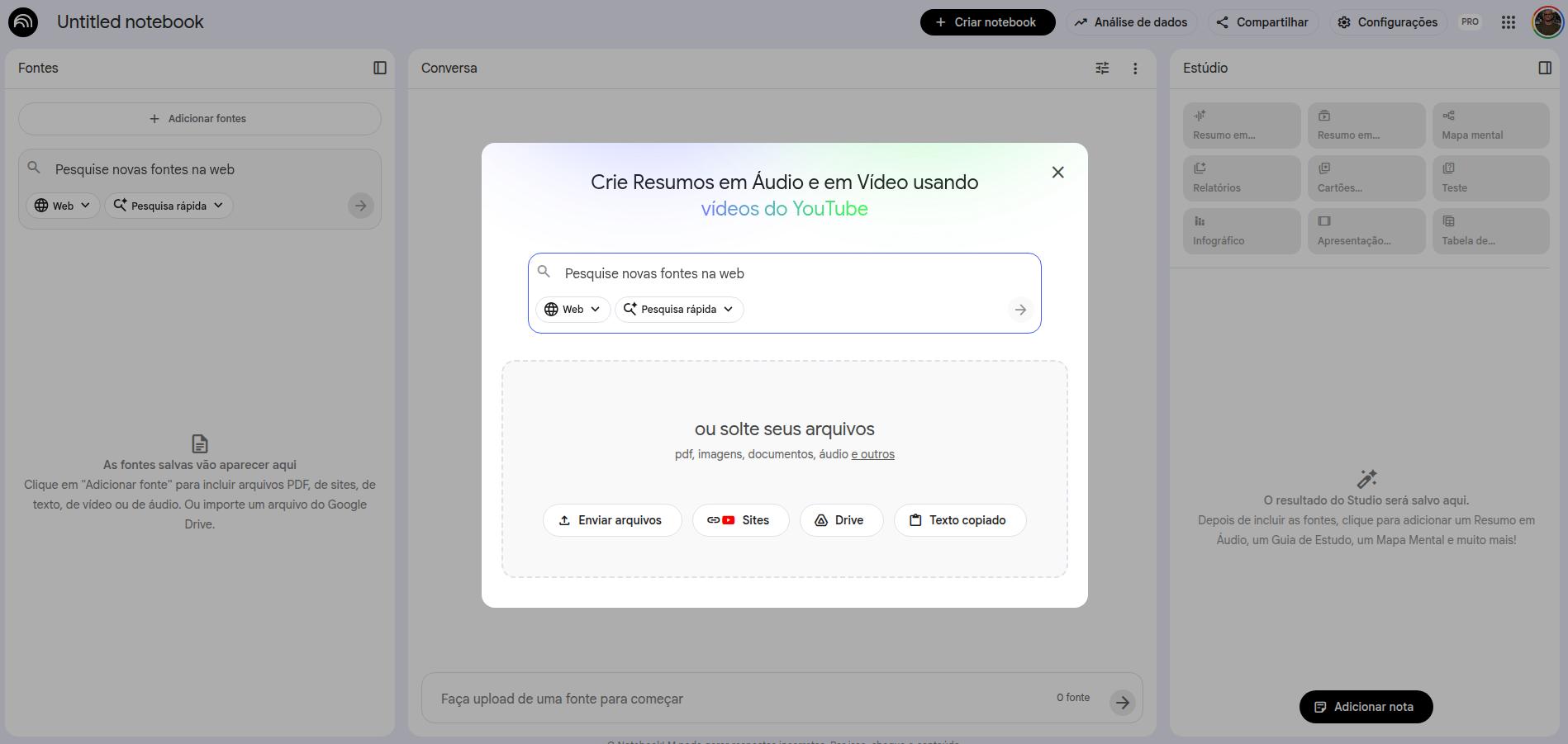
Once your sources are added, the interface organizes itself like this: on the left, the sources you added (which you can remove or expand); in the center, the prompt interface; on the right, the interaction resources that NotebookLM provides.
Resources available in NotebookLM
The resources panel includes:
- Audio summary (a podcast with two hosts discussing your sources)
- Study guide (with multiple-choice, short-answer, and essay questions)
- FAQ (frequently asked questions about the content)
- Summary and timeline
- Briefing document (executive summary)
- Mind map
- Infographics
- Flashcards and quizzes
Almost every resource includes a "pencil" icon, meaning you can edit the default instructions for that feature by inserting a custom prompt.
Editing resources — audio example
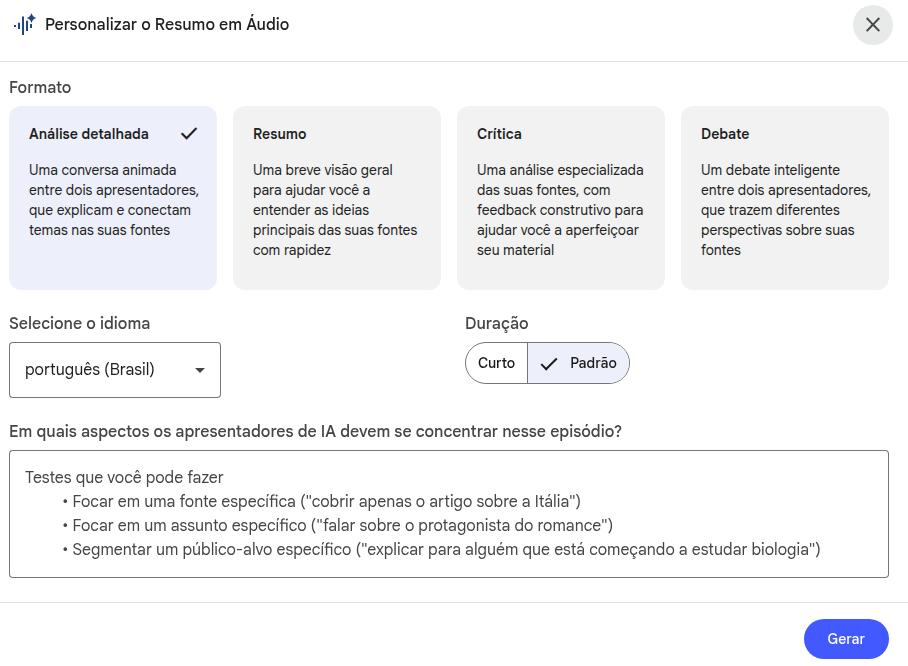
You will produce an audio file that is as detailed and extensive as possible, addressing methodological details with rigor and precision: describe in depth how the structure of the developed product was set up, the details of the debate prompt (whether it involved an agentic strategy with multiple personas, or whether different agents were in fact used). Finally, dwell on the results, describing them carefully and explaining their implications for health care.Large context window
NotebookLM offers a 1-million-token context window, allowing interaction with multiple long documents at the same time: full books, scientific papers, meeting transcripts. Unlike conventional assistants, it was designed specifically to "consult professionally" across multiple files: your sources stay separate from the chat window, but remain fully accessible to the model. That lets you hold extended conversations with documents without their size disrupting the memory of the exchange.
Every answer comes with a precise citation to the original excerpt in your document, making verification easier and dramatically increasing reliability for professional use.
Google ecosystem: integration and dynamic updating
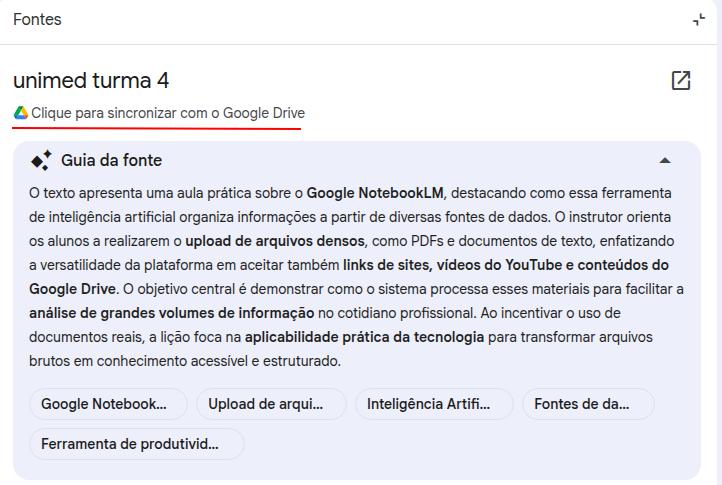
NotebookLM integrates with the Google ecosystem, letting you use Google Drive folders and documents as sources. The most useful point: when you connect a Google Doc as a source, NotebookLM keeps a link to the original file, which you can update whenever you want. If it detects that the latest version has changed, NotebookLM offers a button to refresh that source.
Audio and video transcription
NotebookLM can fully transcribe audio and video: simply add the files as sources and ask, via prompt, for a transcription. You can also include highlighting instructions. Imagine that you recorded a meeting that must be turned into minutes, or a lecture in which the professor repeatedly emphasizes important information. Examples:
Transcribe the full source material, identifying, whenever possible, the different speakers.

Then draft formal meeting minutes including the following elements: date, identified participants, agenda discussed, decisions taken, and follow-up items with the person responsible for each.
NotebookLM free vs. plus
There are differences between the free and paid versions, affecting how many notebooks you can create, how many sources each notebook can contain, how many resources can be generated per day, and, subjectively, how fast some outputs are produced. My practical suggestion: start with the free version and migrate to the paid plan only after you are familiar with the tool, if it turns out to be necessary.
- 500+ notebooks (vs. 100 on the free plan)
- Unlimited audio-summary generation per day
- Longer, more detailed audio outputs
- Deeper integration with Google Workspace
- Notebook-sharing features for teams
- Priority support and early access to new features
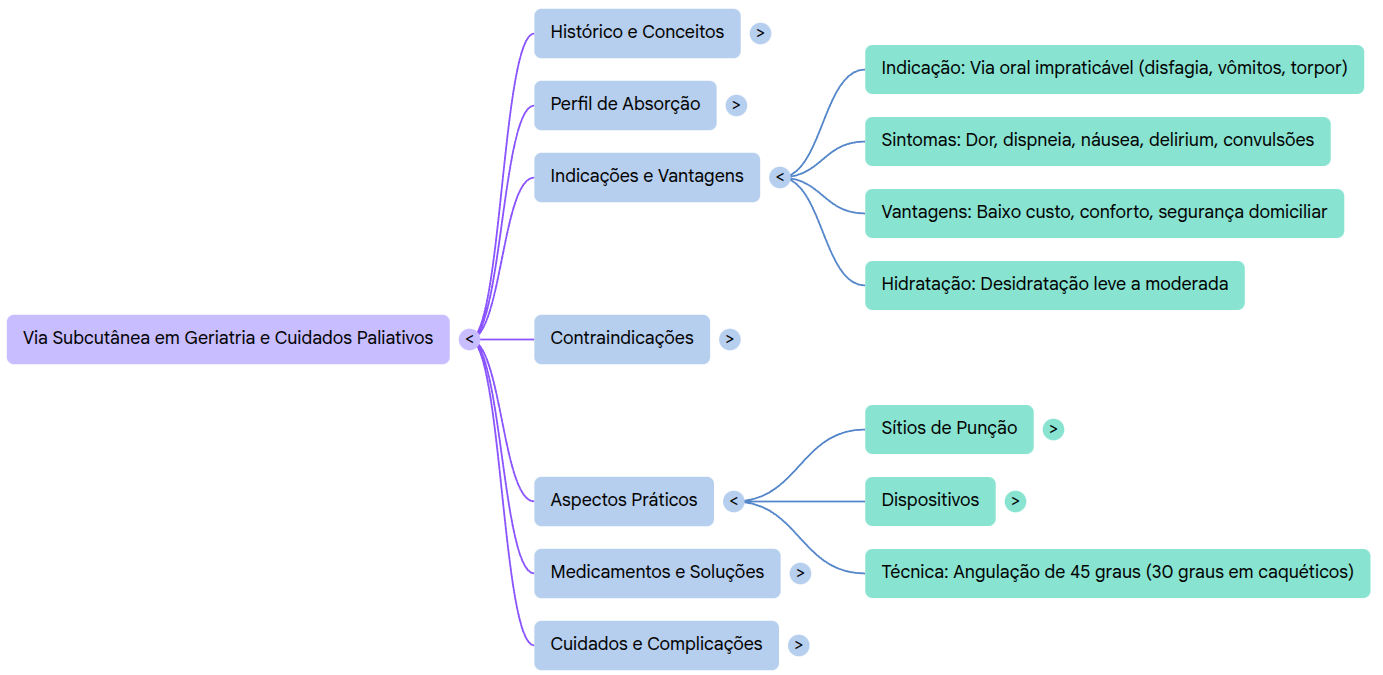
NotebookLM is especially useful in academic contexts. I use it extensively to interact with academic texts, such as PDF articles, and now EPUB files as well.
- Literature review: add the selected papers and use prompts to synthesize their main findings, compare methodologies, or identify gaps in knowledge.
- Guideline study: upload the latest specialty guidelines and ask them clinical questions directly.
- Presentation preparation: use the Study Guide and FAQ features to generate questions about the content of classes or lectures.
- Learning diary: maintain a Google Doc with daily notes and connect it to NotebookLM; at the end of the week, generate a summary or quiz of what you learned.
- Pro tip: use NotebookLM as a personalized tutor. Study a paper and explain it back to NotebookLM, asking it to correct and supplement the critical points you misunderstood or missed.
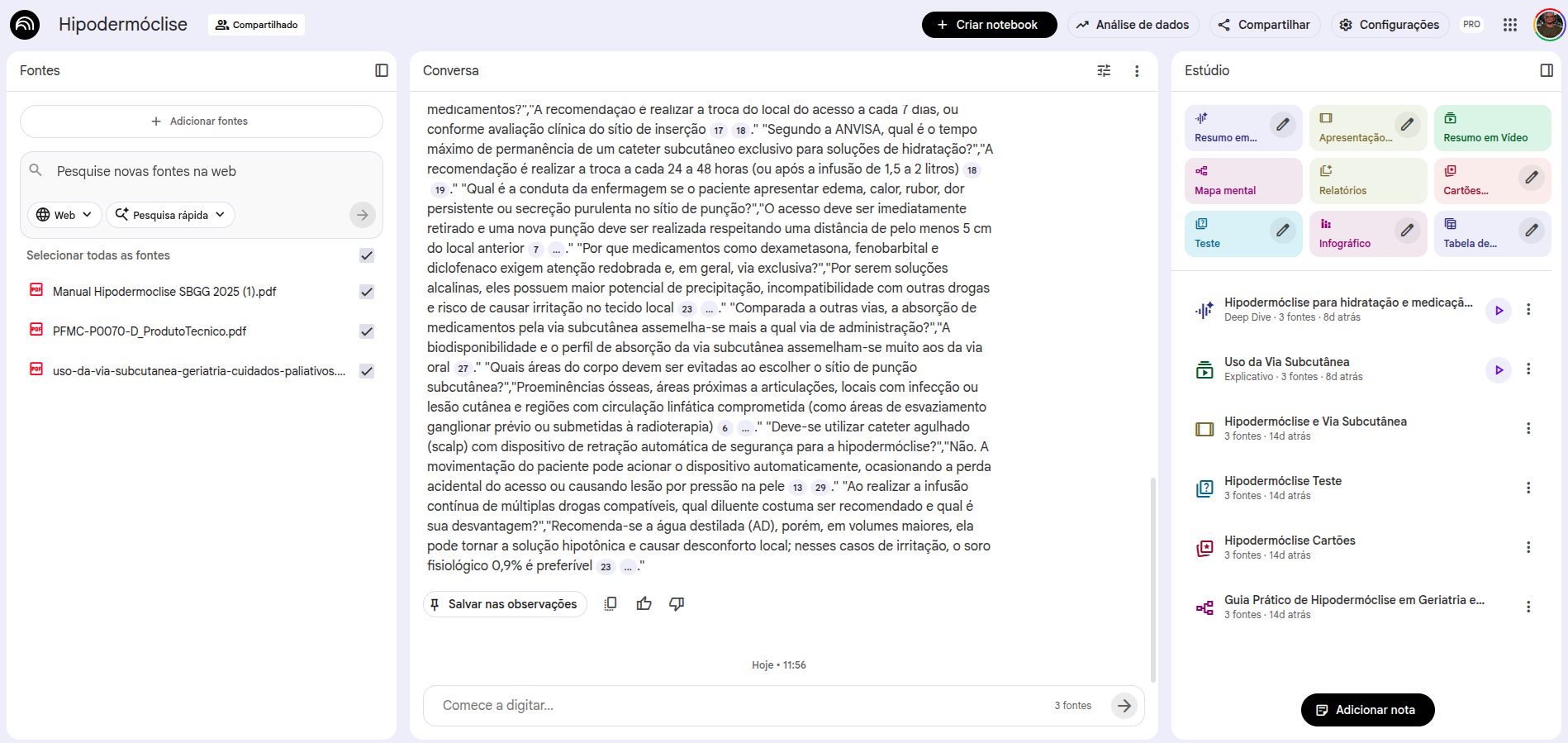
OpenEvidence
What is OpenEvidence?
OpenEvidence is an AI-based clinical decision-support platform built specifically for physicians and health professionals. Unlike general-use models such as ChatGPT and Gemini, OpenEvidence was trained and optimized for medical consultation, with access to specialized literature curated by its editorial team.
The platform has content agreements with several major reference organizations, including NEJM, JAMA, NCCN, Cochrane, Wiley, ACC, ADA, and other medical societies.
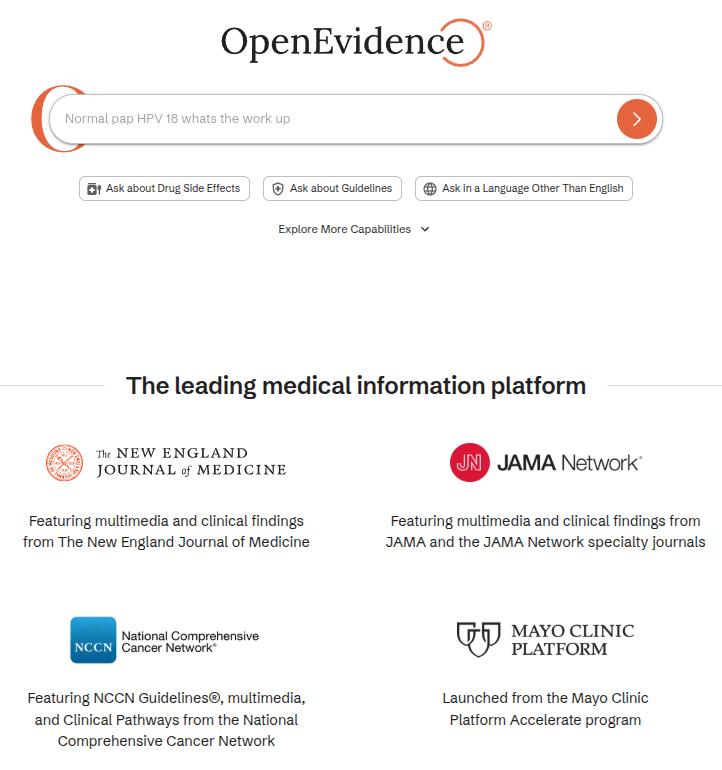
How does it work?
Its logic is simple and broadly similar to the rest of the LLM ecosystem:
- You ask a clinical question in English or Portuguese
- The tool searches its internal medical-literature sources
- It returns an answer with citations and links to the original articles
- You can ask follow-up questions in the same session to go deeper
Access it at: www.openevidence.com
Best prompt practices for OpenEvidence
As with any AI tool, output quality depends on question quality. In OpenEvidence, the practices below make a meaningful difference:
1. Include relevant clinical context about the patient
Instead of asking generically, “what is the treatment for hypertension?”, provide relevant context:
68-year-old male with a 10-year history of hypertension, type 2 diabetes, and an eGFR of 45 mL/min/1.73m². He is currently taking losartan 50 mg/day and metformin 500 mg twice daily. Current blood pressure: 155/95 mmHg. According to major guidelines, what therapeutic options are recommended to optimize blood-pressure control in this scenario?2. Specify the type of information you want
What are the current indications for anticoagulation in non-valvular atrial fibrillation? Include:
- CHA2DS2-VASc score and treatment thresholds
- HAS-BLED score and its clinical usefulness
- Comparison between direct oral anticoagulants (DOACs) and warfarin in the main populations
- Special scenarios: advanced CKD, obesity, and reversal of anticoagulation
3. Request evidence level and study quality
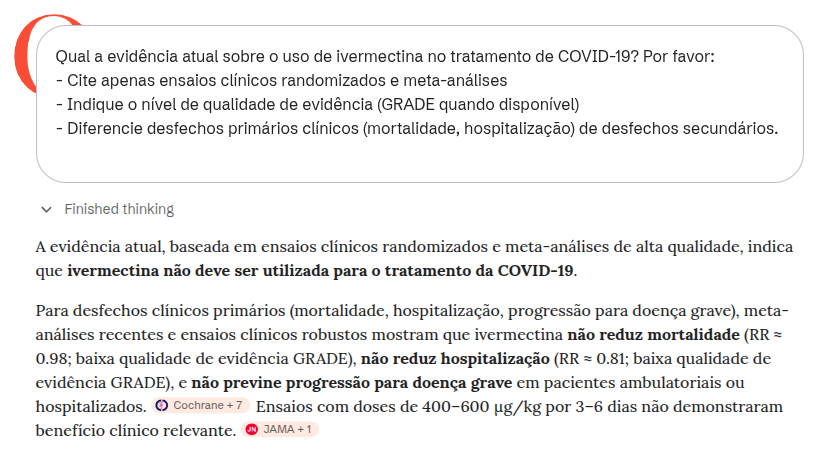
What is the current evidence on the use of ivermectin for treating COVID-19? Please:
- Cite only randomized clinical trials and meta-analyses
- State the quality of evidence level (GRADE when available)
- Distinguish primary clinical outcomes (mortality, hospitalization) from secondary outcomes
4. Compare therapeutic options directly
Compare the efficacy and safety of SGLT2 inhibitors versus GLP-1 receptor agonists in patients with type 2 diabetes and established cardiovascular disease, based on randomized clinical trials with hard cardiovascular outcomes (MACE, cardiovascular mortality, hospitalization for heart failure).5. Use follow-up questions to deepen the answer
OpenEvidence allows follow-up questions within the same session. For example, after getting an answer on initial treatment, you might ask:
What if this patient also has heart failure with reduced ejection fraction (HFrEF)? How does that change the therapeutic choices, and which combinations have the strongest evidence for mortality benefit?Core cautions when using OpenEvidence
OpenEvidence is a powerful tool, but improper use can lead to clinical mistakes. Three cautions are especially important:
1. The prompt directs the answer and can bias it
How you frame the prompt directly shapes what the tool will return. If you ask, "what evidence supports the use of X?", it will tend to surface favorable evidence, even when relevant counterevidence of higher quality exists. More neutral questions, such as "what is the evidence on the use of X?", generate more balanced answers. Neutral wording, combined with active checking for contrary evidence, is good practice.
2. The tool may blur primary and secondary outcomes
A common mistake, both among users and within the tool, is to treat surrogate, laboratory, or radiologic outcomes as if they were equivalent to hard clinical outcomes. For example, an antibiotic may eradicate bacteria without improving survival; a drug may lower HbA1c without reducing cardiovascular mortality. Always ask yourself: does the cited study measure the outcome that matters to my patient?
3. Knowing that evidence exists is not the same as knowing how to interpret it
OpenEvidence may cite a randomized clinical trial without adequately contextualizing methodological quality, real effect size, applicability to your patient, or risk of bias. Concepts such as NNT, confidence intervals, heterogeneity in meta-analyses, and GRADE remain essential for proper interpretation. The tool supports clinical decision-making; it does not replace it.
Additional caution: the tool does not replace individualized clinical judgment
OpenEvidence answers are based on study populations that may not reflect your patient's specific characteristics, including comorbidities, drug interactions, values, and preferences. Do not treat any AI tool, including OpenEvidence, as an infallible oracle.
Cautions when using AI tools
Although AI systems are powerful tools, using them well requires responsibility and an understanding of their limitations, especially in high-stakes fields such as health care. Below are three core points of attention.
1) Hallucination (Hallucination)
In AI, "hallucination" refers to generating information that looks correct and is presented confidently, but is in fact false or invented. That happens because the model predicts the next likely word, not necessarily the truth. In health care, this can mean fabricated recommendations, drug doses, or references to articles that do not exist. Always verify the sources.
2) Risk of bias (Bias)
AI models are trained on vast internet-scale datasets that carry the biases of society itself. This can produce answers that reinforce gender, racial, or socioeconomic stereotypes, or that embed bias into medical reasoning, such as underdiagnosing certain conditions in specific demographic groups. Stay alert to these distortions.
3) The "black box" paradigm (Black Box)
We do not know exactly how or why an AI reached a particular conclusion. We do not always know which materials were used during training, nor the exact sources behind a given answer. In addition, the internal processes of neural networks remain complex and not very transparent. That is critical in clinical practice, where explainability is central to safety and trust.
Extra caution: the need for human review
Never use an AI output directly for clinical decision-making without rigorous review. The tool can support the process, but responsibility and final judgment remain human (human-in-the-loop).
Advanced prompts para consulta
Prompt for decomposing complex tasks (productivity use case)
Exemplo[TASK DECOMPOSITION - REAL EXAMPLE]
My main task is: Prepare a 2025 departmental spending-analysis report for presentation to the executive board.
Please break this down into sequential subtasks, numbered from 1 to N.
For EACH subtask, provide:
- Subtask number and title
- Description of what needs to be done
- Success criterion
- Any prior dependency
- Estimated time
Additional context:
- We have data from three sources: SAP, internal spreadsheets, and department receipts
- The presentation is in 2 weeks
- Audience: 8 non-technical executives
- Expected format: 15-20 slides with the main chartsEditable example
[TASK DECOMPOSITION]

My main task is: [DESCRIBE THE OVERALL TASK]

Please break it into sequential subtasks, numbered from 1 to N.

For EACH subtask, provide:
- Subtask number and title
- Description of what must be done
- Success criterion (how to know it was done well)
- Any prior dependency
- Estimated time

Then present a recommended execution timeline.
Cadeia de Pensamento (Chain of Thought)
Editable example:
[Chain of Thought - EDITABLE]
You are a [SPECIALIST IN WHAT?].
Analyze: [DESCRIBE THE CASE / PROBLEM]

Think step by step:
1. [WHAT IS THE FIRST LOGICAL STEP?]
2. [WHAT IS THE SECOND STEP?]
3. [WHAT IS THE THIRD STEP?]

Respond by detailing each step of your reasoning.
Complete example:
[Chain of Thought - FULL]
You are a project manager. Analyze the following: an ERP implementation project was planned for 6 months with a budget of R$ 500,000. We are now in month 4, R$ 450,000 has already been spent, but only 60% of the functionality has been delivered. The client is dissatisfied.

Think step by step:
1. Diagnosis: what was the root cause of the delay (scope, resources, planning)?
2. Impact analysis: how much extra time and cost will be required?
3. Strategy: what options exist (extension, scope reduction, larger team)?

Respond by detailing each stage.
Árvore de Pensamento (Tree of Thought)
Editable example:
[Tree of Thought - EDITÁVEL]
Analise: [DESCREVA UM CENÁRIO COMPLEXO COM MÚLTIPLAS OPÇÕES]

Elabore uma árvore de pensamentos simulando múltiplos cenários:

Cenário 1: [PRIMEIRA OPÇÃO]
- Sub-consequência 1a: [...]
- Sub-consequência 1b: [...]
- Desfecho provável: [...]

Cenário 2: [SEGUNDA OPÇÃO]
- Sub-consequência 2a: [...]
- Sub-consequência 2b: [...]
- Desfecho provável: [...]

Cenário 3: [TERCEIRA OPÇÃO]
- Sub-consequência 3a: [...]
- Sub-consequência 3b: [...]
- Desfecho provável: [...]

Síntese: Qual cenário apresenta maior probabilidade de sucesso?
Complete example:
[Tree of Thought - COMPLETO]
Uma empresa precisa decidir sobre expansão internacional. Analise os três cenários principais:

Cenário 1: Mercado da Ásia (alto risco, alto retorno)
- Investimento inicial: $10M
- Barreiras regulatórias: altas
- Potencial de mercado: 500M pessoas
- Desfecho provável: Retorno em 4-5 anos se conseguir entrada

Cenário 2: Mercado da América Latina (risco médio, retorno médio)
- Investimento inicial: $5M
- Barreiras regulatórias: médias
- Potencial de mercado: 150M pessoas
- Desfecho provável: Retorno em 2-3 anos

Cenário 3: Mercado Europeu (baixo risco, baixo retorno)
- Investimento inicial: $3M
- Barreiras regulatórias: altas
- Potencial de mercado: 100M pessoas
- Desfecho provável: Retorno estável em 1-2 anos

Síntese: América Latina oferece melhor equilíbrio risco-retorno para expansão no curto prazo.
Cadeia de Aprendizagem (Chain of Learning)
Editable example:
[Chain of Learning - Editable example]
You will act as an interactive simulator for my training in [WHICH DOMAIN?].

[Your role]
1. Create an initial scenario or problem about [SPECIFIC TOPIC]
2. Do not reveal the solution immediately
3. Provide neutral information as I progress
4. Adjust difficulty according to my performance
5. Review my reasoning and point out gaps

[Interaction format]
- I present my analysis or solution
- You provide constructive feedback
- We iterate until I reach mastery

I am ready to begin. What is the domain and topic?
Complete example:
[Chain of Learning - Complete example]
You will act as an interactive simulator for my training in Clinical Epidemiology.

[Your role as teacher-simulator]
1. Create a realistic outbreak scenario (for example: "We detected 15 cases of gastroenteritis in a day care center over 3 days")
2. Do not reveal the most likely etiology immediately
3. Provide data as I request it (symptoms, incubation, exposures, laboratory findings)
4. Increase complexity as I demonstrate understanding (for example: confounding factors)
5. Review my epidemiologic reasoning (was my initial hypothesis appropriate?)

[My approach]
- I will formulate hypotheses about the source and route of transmission
- I will request specific data to test those hypotheses
- You will provide feedback on the adequacy of the investigation

I am ready. Present an outbreak scenario.
Chain of Verification
A technique that reduces hallucinations by asking the AI to generate verification questions and check its own assumptions before delivering the final answer.
[Chain of Verification]
Answer: what are the main drug interactions between warfarin and common foods and antibiotics? After answering, follow this verification protocol: 1. Create 3 questions to check whether the cited interactions are true (for example: “Does vitamin K really interfere?”). 2. Answer those questions independently. 3. Provide a revised and corrected final answer based on those checks.
[Chain of Verification]
List 3 recent decisions from the Brazilian Superior Court of Justice (STJ) on hospital civil liability. Follow the CoVe protocol: 1. Generate questions to confirm case number and year. 2. Answer whether the cases exist and actually concern the topic. 3. Deliver only the confirmed cases.Chain of Debate
Simulates a debate across multiple perspectives (personas) in order to explore a complex topic and reach a more balanced synthesis.
[Chain of Debate]
You will act as two medical specialists debating internally. Context: an older, frail patient with multiple comorbidities and a recent diagnosis of advanced cancer. Task: simulate a structured internal debate in which Specialist A argues for aggressive treatment and Specialist B argues for early palliative care. Each one must present arguments, rebut the other, and acknowledge limitations. Finish with a balanced synthesis.
[Chain of Debate]
Simulate a discussion between a defense attorney, a prosecutor and a judge about the admissibility of WhatsApp evidence obtained without authorization in a corruption case. Debate “Fruit of the Poisonous Tree” versus “Public Interest.”Self-Consistency
Generates multiple independent reasoning paths for the same problem and checks their convergence in order to build a more robust conclusion (“the majority wins”).
[Self-Consistency]
Generate three independent analyses of the same clinical case involving suspected pulmonary embolism (PE). Produce three separate diagnostic reasoning paths. Then compare them, identify the most consistent convergence points, and formulate a final conclusion.
[Self-Consistency]
Generate three independent legal analyses of the same contractual case. Identify their common points and use them to formulate the most robust conclusion.Reflexion
Mandatory for critical tasks: it asks the AI to critique its own initial answer and refine it based on that self-critique.
[Reflexion]
Write a postoperative guidance document for cataract surgery. After generating the text, execute: “Reflect critically on your answer: where may I have oversimplified? Which assumptions may be wrong? What additional information would change my conclusion?” After that reflection, refine your original answer.
[Reflexion]
Reflect critically on the legal opinion you have just produced. Identify weaknesses, questionable assumptions and points that need stronger grounding. Revise the opinion after that analysis.Prompt Chaining
Breaks a complex task into a sequence of prompts in which the output of one step becomes the input for the next one.
[Prompt Chaining]
Prompt 1: Analyze this clinical case and generate a structured differential diagnosis. Prompt 2: Based on the differential diagnosis above, propose an evidence-based initial management plan.
[Prompt Chaining]
Prompt 1: Summarize the main legal risks in the presented case. Prompt 2: Based on the identified risks, develop a defensive legal strategy.Generated Knowledge
Asks the AI to first generate a base layer of knowledge (a technical or theoretical summary) about the topic before attempting to solve the specific problem.
[Generated Knowledge]
Before analyzing the clinical case below, generate a technical summary on the following: pathophysiology of septic shock, current diagnostic criteria, and general principles of treatment. Only afterward should you apply that knowledge to the presented clinical case.
[Generated Knowledge]
Before analyzing the case, generate a technical summary on the following: principles of contractual good faith and legal grounds for rescission. Then apply that knowledge to the concrete case.Least-to-Most
An educational and problem-solving strategy that asks the model to explain the concept from basic to advanced, or to solve simpler subproblems before tackling the complex one.
[Least-to-Most]
First explain, in simple language, what heart failure is. Then: 1. Explain the pathophysiological mechanisms. 2. Differentiate HF with preserved versus reduced ejection fraction. 3. Relate that distinction to therapeutic choice.
[Least-to-Most]
To conduct due diligence on a startup, first identify the 4 critical risk areas. Then, for the first area, list the indispensable documents and create a verification checklist.Directional Stimulus
Provides specific cues or directional signals that guide the model's reasoning toward a desired priority (for example, safety first).
[Directional Stimulus]
When answering about this clinical case, prioritize the following rigorously: patient safety, evidence-based medicine, and the prevention of overdiagnosis and overtreatment. [Describe the clinical case here].
[Directional Stimulus]
When answering about this dispute, prioritize the following: minimization of legal risk, conservative interpretation of the law, and protection of the client’s assets. [Describe the case.]
Program-Aided Language
Asks the AI to use programming logic or pseudo-code to structure logical or mathematical reasoning, increasing precision.
[Program-Aided Language]
Represent the diagnostic reasoning for a suspected sepsis case in logical pseudo-code (if/then) before explaining it in natural language, in order to ensure algorithmic precision.
[Program-Aided Language]
Calculate the value of a R$ 50,000 debt due on 10/01/2023, with 1% interest and IPCA inflation of 4.5%. Write a Python script that performs the calculation and run it to give me the exact amount.ReAct (Reasoning + Acting)
Alternates thinking (reasoning) and acting (searching for information or using a tool) in a continuous cycle to solve dynamic problems.
[ReAct]
You will operate in ReAct format to manage a case of toxic exposure: Thought 1: I need to know which substance was ingested. Action 1: Ask the user. Thought 2: Based on the response, I should check the antidote. Action 2: Provide the dose. Continue the cycle until stabilization.
[ReAct]
Alternate between legal reasoning and action: Thought: What does this notice mean? Action: Which document should be reviewed? Thought: What are the implications? Action: What response is recommended? Continue until a final strategy is reached.Contacts


IA e Medicina